Colour Palette
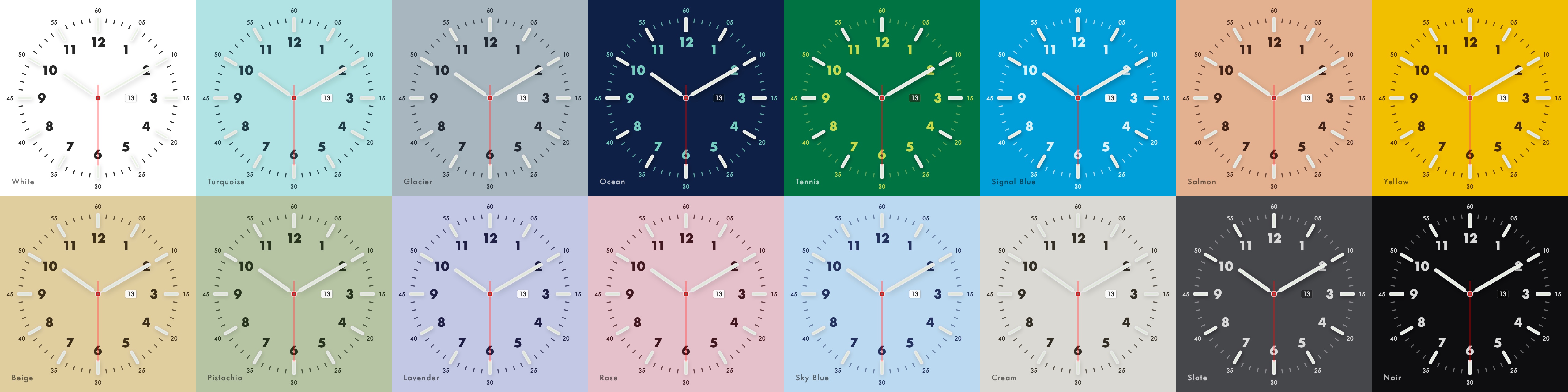
16 curated dials.
Each theme is a considered palette with matched hand shadows, tick marks, and numerals. Dark dials glow. Light dials cast shadows.
macOS Screensaver
Transform your Mac display into a Swiss-inspired timepiece. Luminescent night mode, curated dial themes, and live weather — distilled into the most beautiful screensaver you've ever seen.
Crafted Details
From turquoise to noir — each palette inspired by iconic watch dial colours, with shadows and highlights for authentic depth.
Luminescent night mode with 14 glow colours and adjustable intensity. Designed to feel like Super-LumiNova in the dark.
Live weather wherever you are: search any city or use your Mac's location. Auto sunrise/sunset detection switches between day and night modes seamlessly.
Quartz precision, mechanical sweep, or digital tick — choose the second-hand motion that matches your temperament.
Bring your own background. Pick any image or pull the current desktop wallpaper; an adjustable dim keeps the dial in focus.
Luminescence
Inspired by the glow of Super-LumiNova on high-end watch dials. When night falls — automatically or on command — every element transforms with adjustable luminescence.
Colour Palette
Each theme is a considered palette with matched hand shadows, tick marks, and numerals. Dark dials glow. Light dials cast shadows.
World Time
Live temperature for any city on Earth. Search by name or let your Mac find your location, and the auto mode calculates sunrise and sunset there with NOAA solar algorithms to toggle night mode perfectly.
Calibre
The second hand tells the story. Choose the beat that matches you.
Crisp, decisive one-second jumps. Each tick marks an exact moment in time.
8 beats per second — the measured heartbeat of a fine Swiss mechanical calibre.
Silky-smooth continuous sweep. The precision of quartz crystal, rendered at 60fps.
Questions
Yes. Chronoface is a free, open-source (MIT) minimalist clock screensaver for macOS. No subscriptions, no ads, no accounts. The full source code is on GitHub.
Any Mac running macOS 13 Ventura or newer. The installer is universal and runs natively on both Apple Silicon and Intel Macs.
Fliqlo and Padbury Clock are digital-style clocks. Chronoface is a true analog watch face with 16 curated dial themes, three movement styles and a luminescent night mode. And unlike paid clock screensavers such as Bauhaus Clock, it is completely free and open source.
No. The clock, night mode and sunrise/sunset calculations (NOAA solar algorithms) work fully offline. Only the optional live weather complication fetches data.
Yes. The live web demo runs the exact same dial geometry in your browser tab.
Free for macOS. No subscriptions, no tracking, no ads.
Open the .pkg and follow the installer. It auto-detects your macOS:
modern App + screensaver extension on Sonoma and Tahoe,
legacy .saver on Ventura. Configure themes from the Chronoface app
in Applications; uninstall lives in the app menu.